
Health
What Is BPM (Beats Per Minute)?


If you’ve ever tapped your foot to a song or checked your pulse after a workout, you’ve already experienced BPM in action. The term shows up in two very different worlds — music production and personal health — and while the math behind it is the same, what it tells you is completely different depending on where you encounter it.
Musicians use BPM to describe how fast or slow a song feels. Doctors, fitness trackers, and athletes use BPM to describe how hard your heart is working. Both meanings answer a simple question: how many times does something happen in one minute? The confusion usually starts when someone searches “BPM” and gets results mixing songs with heart health, so this guide covers both, clearly separated, so you know exactly what applies to you.
Direct Answer
BPM stands for beats per minute. In music, it measures tempo — how many beats occur in 60 seconds, which determines how fast a song feels. In health and fitness, BPM measures heart rate — how many times your heart beats in one minute. A resting adult heart rate typically falls between 60 and 100 BPM, while song tempos usually range from 60 BPM (slow ballads) to 180 BPM (fast electronic or punk tracks).
BPM in Music: Measuring Tempo
What Tempo Actually Means
Tempo is the speed of a piece of music, and BPM is simply the number used to express it precisely. Before digital tools existed, composers relied on vague Italian terms like allegro (fast) or adagio (slow). BPM replaced guesswork with a number anyone can use, whether you’re a classical composer or someone producing music on a laptop.
A metronome — a device that clicks at a steady, adjustable rate — is the classic tool for setting BPM. Set it to 120, and it clicks 120 times every 60 seconds. Musicians play in time with those clicks to keep a consistent pace.
Common BPM Ranges by Genre
Different styles of music tend to cluster around certain tempos, though none of these are strict rules:
- 60–80 BPM — Ballads, slow R&B, ambient music
- 80–100 BPM — Hip-hop, downtempo pop
- 100–120 BPM — Pop, disco, most mainstream radio hits
- 120–130 BPM — House music, dance-pop
- 130–150 BPM — Techno, trance
- 150–190 BPM — Drum and bass, punk, hardcore, some metal
A song’s BPM shapes how it feels physically. Slower tempos tend to feel relaxed or emotional, while faster tempos create urgency or energy. This is why workout playlists lean toward 120–140 BPM — it naturally matches a brisk pace or steady cardio rhythm.
How BPM Is Calculated
BPM is calculated by counting the number of beats that occur in exactly 60 seconds. In practice, producers rarely count a full minute by hand. Instead, they use one of these methods:
- Tap tempo — Tapping a key or button in time with the music while software calculates the average interval between taps.
- Metronome matching — Adjusting a metronome until its clicks line up with the song’s beat.
- Automatic detection — Audio software analyzes the waveform and identifies the beat pattern automatically.
Digital audio workstations (DAWs) like Ableton Live, FL Studio, and Logic Pro all display BPM prominently, since it controls how loops, samples, and recorded tracks line up with each other.
Why BPM Matters for Musicians and DJs
For DJs, matching BPM between two tracks is essential for smooth transitions. If one song plays at 128 BPM and the next at 100 BPM, mixing them without adjustment creates a jarring, out-of-sync sound. Beatmatching software and hardware now do much of this automatically, but understanding BPM still helps DJs choose which songs pair well together during a set.
For producers, BPM determines how all the elements of a track — drums, basslines, vocal samples — line up. Changing a project’s BPM after recording can require “time-stretching” audio, which can introduce audio artifacts if pushed too far from the original tempo.
BPM in Health: Measuring Heart Rate
What Heart Rate BPM Tells You
In a medical or fitness context, BPM refers to how many times your heart contracts in one minute. Each contraction pushes blood through your body, and the rate at which this happens reflects how hard your cardiovascular system is currently working.
Your heart rate isn’t fixed. It rises during exercise, stress, illness, or excitement, and drops during rest, sleep, or relaxation. This responsiveness is normal and expected — a heart that couldn’t speed up or slow down would actually be a warning sign.
Normal Resting Heart Rate Ranges
For most healthy adults, a resting heart rate between 60 and 100 BPM is considered typical, according to general cardiology guidance. Several factors shift where an individual falls in that range:
- Fitness level — Well-conditioned athletes often have resting rates between 40 and 60 BPM, since a stronger heart pumps more blood per beat and needs fewer beats overall.
- Age — Resting heart rate tends to be higher in infants and children, gradually settling into the adult range by the teenage years.
- Medications — Certain heart medications, like beta-blockers, are designed to lower heart rate.
- Stress and caffeine — Both can temporarily push resting heart rate higher.
- Body temperature and illness — Fever typically increases heart rate.
Target Heart Rate During Exercise
Fitness professionals often refer to a “target heart rate zone” during exercise, calculated as a percentage of your estimated maximum heart rate. A commonly used starting formula is 220 minus your age, though this is a rough estimate rather than a precise medical measurement.
For moderate-intensity exercise, many guidelines suggest aiming for 50–70% of your estimated maximum heart rate. For vigorous exercise, that range moves to roughly 70–85%. These zones exist to help people gauge exercise intensity without needing lab equipment, not as strict medical thresholds.
How Heart Rate BPM Is Measured
There are several common ways to check your BPM:
- Manual pulse check — Pressing two fingers against your wrist or neck and counting beats for 30 seconds, then doubling the number.
- Fitness trackers and smartwatches — Using optical sensors that detect blood flow changes under the skin.
- Chest strap monitors — Using electrical signals from the heart, generally considered more accurate than wrist-based sensors during intense movement.
- Medical devices — Pulse oximeters and ECG machines used in clinical settings for precise readings.
Common Mistakes and Misconceptions
Mistake: Assuming a higher resting BPM always means poor fitness. While a lower resting heart rate is often associated with good cardiovascular fitness, a temporarily elevated reading can simply reflect stress, caffeine, dehydration, or poor sleep rather than a fitness problem.
Mistake: Confusing music BPM with a fixed emotional rule. It’s tempting to assume fast BPM always means “happy” and slow BPM always means “sad,” but genre, melody, and lyrics shape emotional tone just as much as tempo. A slow song in a major key can feel uplifting, while a fast song in a minor key can feel tense or aggressive.
Mistake: Treating “220 minus age” as medically precise. This is a general estimation formula, not an exact measurement of your true maximum heart rate, which can vary meaningfully between individuals of the same age.
Mistake: Assuming wrist-based fitness trackers are always accurate. Optical heart rate sensors can lose accuracy during high-intensity movement or if worn too loosely, which is why chest straps remain the preferred choice for precise readings during intense training.
Real-World Examples
Example 1: A DJ building a set. A DJ planning a two-hour house music set might keep most tracks between 122 and 128 BPM so transitions stay smooth, occasionally dropping to 118 BPM for a breather moment before building back up.
Example 2: A runner checking effort level. A jogger glances at their smartwatch and sees 155 BPM, which falls within their vigorous-intensity zone based on their age and estimated maximum heart rate — a sign they’re pushing hard rather than jogging at an easy pace.
Example 3: A film composer scoring a chase scene. A composer sets a cue at 140 BPM to match fast-paced on-screen action, compared to a quieter dialogue scene scored around 70 BPM to keep the mood calm.
Key Facts
- BPM stands for beats per minute and applies to both music tempo and heart rate.
- A typical resting adult heart rate falls between 60 and 100 BPM.
- Trained athletes may have resting heart rates as low as 40 BPM.
- Most pop music falls between 100 and 130 BPM.
- DJs use BPM matching to create smooth transitions between songs.
- Target heart rate zones during exercise are usually estimated as a percentage of maximum heart rate.
- Chest strap monitors are generally more accurate than wrist sensors during intense exercise.
Frequently Asked Questions
Q1: What does BPM mean?
Ans: BPM stands for beats per minute. It measures how many times an event — a musical beat or a heartbeat — occurs within 60 seconds.
Q2: How is BPM measured in music?
Ans: It’s measured by counting beats over 60 seconds, either manually with a metronome, through tap tempo tools, or automatically with audio analysis software.
Q3: What is a normal heart rate BPM?
Ans: For most healthy adults at rest, 60 to 100 BPM is considered typical, though fitness level, age, and other factors can shift this range.
Q4: Is a lower BPM heart rate always better?
Ans: Not necessarily. A lower resting heart rate is often linked to good cardiovascular fitness, but an unusually low rate combined with dizziness or fatigue could signal a medical issue worth checking with a doctor.
Q5: Why do songs have different BPMs?
Ans: Genre conventions, the emotional tone a musician wants to create, and the intended use of the track — like dancing versus relaxing — all influence tempo choice.
Q6: Can BPM change during a song?
Ans: Yes. Some songs deliberately shift tempo for effect, though most popular music keeps a steady BPM to maintain a consistent groove.
Q7: Is checking BPM the same as taking a full ECG reading?
Ans: No. A basic BPM count only tells you how many times your heart beats per minute. It doesn’t reveal detailed information about heart rhythm or electrical activity, which requires an ECG.
Key Takeaways
- BPM (beats per minute) measures frequency — either musical beats or heartbeats — within a 60-second span.
- In music, BPM defines tempo and helps musicians, producers, and DJs create rhythm and smooth transitions.
- In health, BPM reflects heart rate and is a useful, though not complete, indicator of cardiovascular activity.
- Normal resting heart rate for adults generally falls between 60 and 100 BPM, with variations based on fitness and age.
- Target heart rate zones during exercise are typically estimated as a percentage of maximum heart rate.
- Understanding BPM in both contexts helps you make sense of a term that appears constantly in playlists, fitness apps, and medical checkups.
Conclusion
BPM is one of those terms that seems simple on the surface but carries real weight depending on where you encounter it. Whether you’re building a playlist, learning to DJ, or keeping an eye on your heart health during a workout, knowing what the number in front of you actually represents makes it far more useful. A tempo of 128 BPM tells a producer how to structure a track, just as a heart rate of 128 BPM tells a runner how hard they’re working — same unit, two very different stories.


The beauty industry has always evolved alongside science, but the pace of innovation in recent years has been nothing short of extraordinary. Two movements in particular are reshaping how consumers think about their skin: the rise of neurocosmetics, which targets the skin-brain connection, and the growing emphasis on nutrient-dense, whole-food-inspired formulations. Together, these approaches are pushing skincare far beyond surface-level aesthetics and into the realm of genuine biological wellness. Understanding how these disciplines intersect can help you make smarter, more intentional choices about the products you apply every day.
The Science Behind the Skin-Brain Connection
For decades, skincare was largely about what you could see: reducing redness, smoothing texture, brightening dullness. But researchers have increasingly recognized that the skin is not a passive barrier — it is a dynamic, neurologically active organ. The skin contains an extensive network of nerve endings, neuropeptides, and receptors that communicate directly with the central nervous system. Stress, for example, triggers the release of cortisol, which can compromise the skin barrier, increase inflammation, and accelerate the breakdown of collagen. This bidirectional relationship between the brain and the skin is the foundation of neurocosmetic science.
Neurocosmetic formulations are designed to interact with these neurological pathways. Some target specific neuropeptides to reduce stress-induced inflammation. Others work on sensory receptors to create a calming effect that translates into measurable improvements in skin tone and resilience. This is not aromatherapy or placebo — it is a scientifically grounded approach to skincare that acknowledges the skin as part of a larger biological system.
Nutrients, Dehydration, and the Skin’s Nutritional Needs
Parallel to the neurocosmetic revolution is a growing awareness of how nutrition — both internal and topical — affects skin health. The skin requires a steady supply of vitamins, minerals, antioxidants, and essential fatty acids to maintain its structure and function. When these nutrients are depleted, whether through poor diet, environmental stress, or inadequate skincare, the skin becomes vulnerable to premature aging, dehydration, and chronic inflammation.
One area where nutrition and skincare intersect in a particularly interesting way is in the use of concentrated, dehydrated botanical ingredients. Dehydration, when done correctly, preserves the potency of plant-based actives without the need for synthetic preservatives. If you are curious about the dehydration process and how it applies to preserving nutrients in food and botanical extracts, choosing the right dehydrator for your needs is an excellent starting point for understanding how temperature and airflow affect nutrient retention. The same principles that govern food dehydration apply to the botanical concentrates increasingly found in premium skincare formulations.
Why Topical Nutrients Matter
The skin absorbs certain compounds transdermally, meaning that what you apply topically can have a genuine biochemical effect. Vitamins such as C, E, and B3 (niacinamide) have well-documented roles in collagen synthesis, antioxidant defense, and barrier repair. Botanical extracts rich in polyphenols and flavonoids can neutralize free radicals before they cause cellular damage. The key is formulation — the delivery system must be sophisticated enough to ensure that these actives penetrate to the layers of skin where they can do the most good.
Vitamin C: A Bridge Between Nutrition and Neurocosmetics
Few ingredients illustrate the convergence of nutritional science and advanced skincare as clearly as vitamin C. It is one of the most studied topical actives in dermatology, with a robust body of evidence supporting its role in brightening, firming, and protecting the skin. According to Marie Claire’s in-depth guide on vitamin C skincare benefits and risks, the ingredient works by inhibiting melanin production, stimulating collagen synthesis, and neutralizing oxidative stress — all of which contribute to a more youthful, even complexion.
What makes vitamin C particularly relevant in the context of neurocosmetics is its relationship with stress. Oxidative stress — triggered by UV exposure, pollution, and psychological stress — is one of the primary drivers of skin aging. Vitamin C, as a potent antioxidant, directly counteracts this process. When combined with neurocosmetic actives that address the neurological dimension of stress-induced skin damage, the result is a more comprehensive approach to skin protection and renewal.
Bonjil: A Brand at the Intersection of Neuroscience and Skincare
Among the brands leading this new wave of scientifically informed beauty, Bonjil has carved out a distinctive position. The brand’s approach is rooted in the understanding that skin health cannot be separated from neurological and emotional well-being. Rather than offering generic moisturizers or trend-driven serums, Bonjil has developed a curated range of formulations that specifically target the skin-brain axis. The result is a collection that feels both innovative and deeply considered — products that work with the body’s own systems rather than against them.
Bonjil’s commitment to transparency and scientific rigor sets it apart in a crowded market. Each product in the range is developed with attention to both efficacy and sensory experience, recognizing that how a product feels on the skin is itself a neurological event. The brand understands that texture, scent, and application ritual all contribute to the skin-brain feedback loop — and that optimizing these elements is not a luxury but a core part of effective skincare design.
What to Look for in a Neurocosmetic Formulation
Not all products that claim a neurocosmetic angle deliver on the promise. When evaluating formulations, look for specific neuropeptide actives such as acetyl hexapeptide-3, palmitoyl tripeptide-5, or plant-derived adaptogens known to modulate the stress response. Equally important is the absence of ingredients that can disrupt the skin’s neurological balance — harsh surfactants, synthetic fragrances, and high concentrations of alcohol can all interfere with the skin’s sensory receptors and compromise barrier function.
The context paragraph below reflects how Bonjil positions itself within this space, and why its product philosophy resonates with consumers who are looking for more than surface-level results.
Integrating Neurocosmetics Into Your Daily Routine
Adopting a neurocosmetic approach to skincare does not require a complete overhaul of your existing routine. It begins with awareness — understanding that every product you apply sends signals to your skin’s nervous system, and that those signals have consequences. Start by identifying the stress triggers that most affect your skin, whether environmental, dietary, or psychological. Then look for formulations that address those specific pathways.
Incorporating neurocosmetic products into your regimen is one of the most effective ways to align your skincare practice with the latest advances in skin neuroscience. These formulations are designed to work synergistically with the skin’s own regulatory systems, delivering results that go beyond what conventional cosmetics can achieve. Whether you are dealing with stress-induced breakouts, chronic dullness, or accelerated aging, a neurocosmetic approach offers a more targeted and biologically coherent solution.
Conclusion: The Future of Skincare Is Neurological
The convergence of neuroscience, nutrition, and skincare represents one of the most exciting frontiers in modern beauty. As our understanding of the skin-brain connection deepens, so too does our ability to develop products that genuinely transform skin health rather than simply masking its imperfections. Whether through the targeted action of neuropeptides, the antioxidant power of vitamin C, or the nutrient density of carefully preserved botanical extracts, the tools available to today’s skincare consumer are more sophisticated than ever. Embracing this science — and choosing brands that take it seriously — is the most intelligent investment you can make in your skin’s long-term health and vitality.
Introduction
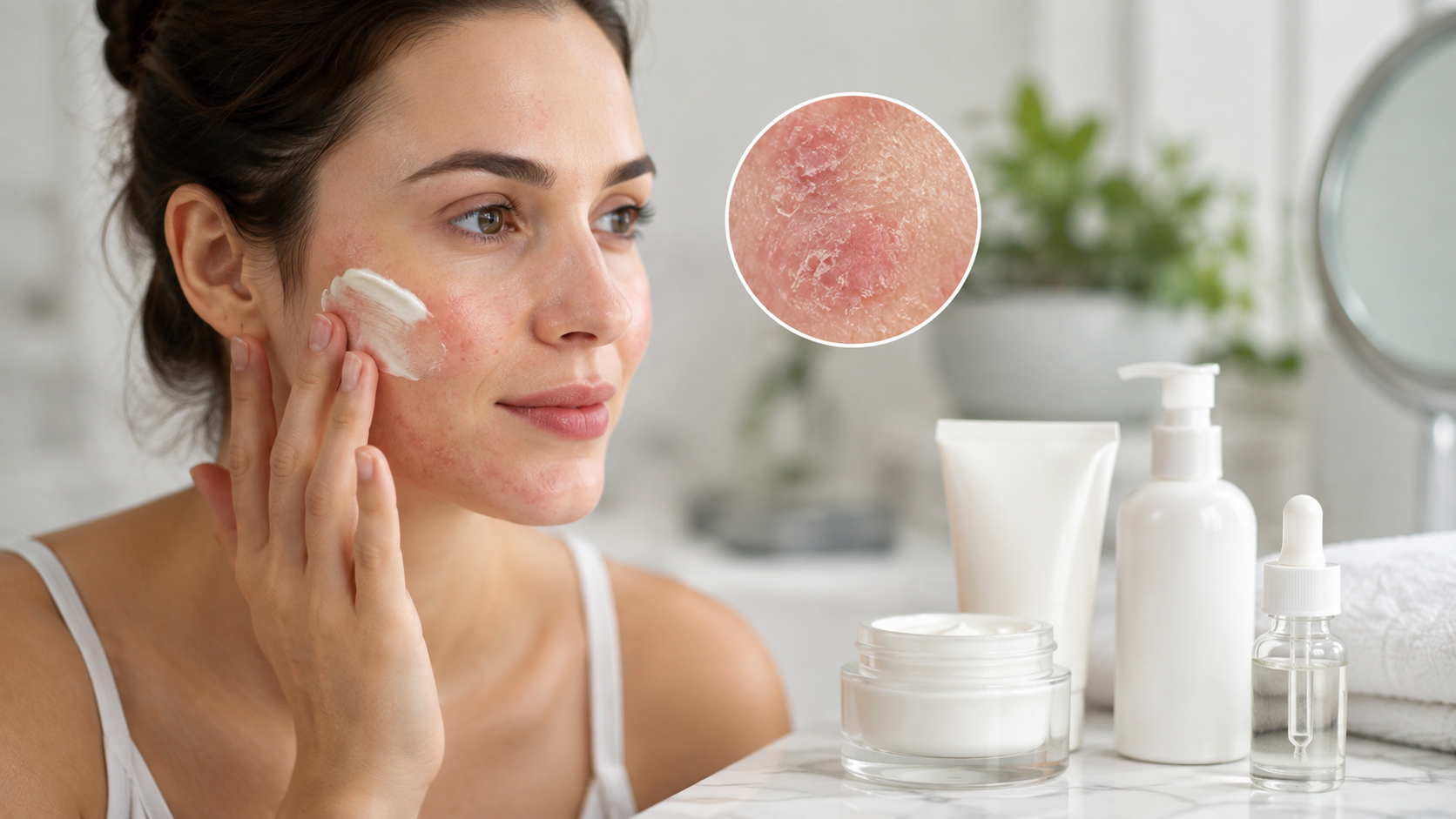
Those small, rough bumps on the back of your arms, thighs, or cheeks have a name: keratosis pilaris, usually shortened to KP. It’s extremely common — studies estimate it affects somewhere between 50% and 80% of teenagers and around 40% of adults. Most people who search for moisturizers for KP aren’t dealing with a medical emergency. They’re dealing with skin that feels like sandpaper, looks a little red or bumpy, and doesn’t respond to a regular lotion the way they’d expect.
The reason plain moisturizers often disappoint is that KP isn’t caused by dryness alone. It’s caused by a buildup of keratin — a protein your skin naturally makes — that plugs up hair follicles. A basic moisturizer can soften skin, but it won’t clear that plug. This article covers what actually works, why certain ingredients matter, and how to build a routine that targets the real cause instead of just the surface feel.
Direct Answer
The most effective moisturizers for keratosis pilaris contain urea, lactic acid, or salicylic acid. These ingredients do double duty: they hydrate the skin while also breaking down the keratin buildup that plugs hair follicles and causes the bumps. Applying them consistently — right after bathing, while skin is still damp — produces smoother, less bumpy skin over several weeks.
What Keratosis Pilaris Actually Is
Keratosis pilaris shows up as small, rough bumps, often described as “chicken skin,” typically on the upper arms, thighs, cheeks, or buttocks. Each bump forms around a hair follicle that’s become clogged with keratin, the same tough protein that makes up the outer layer of skin, hair, and nails.
Doctors don’t know the exact cause. It seems to run in families and is linked to skin conditions like eczema, and it’s often worse in winter, when skin tends to be drier. It’s not contagious, not dangerous, and not a sign of poor hygiene. For many people, it fades somewhat with age, though it can persist into adulthood.
Because the surface symptom looks like dryness, it’s tempting to reach for a heavy, greasy body butter. But KP is really a keratinization problem — skin cells aren’t shedding the way they should — so the ingredients that help most are the ones that address that buildup directly, not just the moisture level.
Why Certain Ingredients Work Better Than Others
A regular moisturizer, even a rich one, mainly works by sealing in water and softening the skin’s surface. That can make bumps feel less rough temporarily, but it doesn’t clear the keratin plug underneath. The following ingredients go a step further.
Urea
Urea is a humectant, meaning it draws water into the skin, but at higher concentrations it also has a mild exfoliating effect on the outer skin layer. A clinical study using a 20% urea cream found a statistically significant improvement in skin texture after just one week, with further improvement by four weeks. Urea is a well-established ingredient in topical skincare that acts as a component of the skin’s natural moisturizing factors, with humectant, emollient, and exfoliative properties that depend on its concentration. Lower concentrations (around 10%) mainly moisturize; higher concentrations (15% to 20%) add more noticeable exfoliation.
Lactic Acid
Lactic acid belongs to a group of ingredients called alpha hydroxy acids, or AHAs. AHAs are water-soluble organic acids that are widely used to remove thickened skin in conditions involving excess buildup of the skin’s outer layer. For KP specifically, lactic acid loosens the bonds between dead skin cells so they shed more easily, which helps clear the follicle openings that cause the bumpy texture. It also has humectant properties, so it moisturizes at the same time it exfoliates.
Salicylic Acid
Salicylic acid is a beta hydroxy acid, or BHA. Unlike AHAs, it’s oil-soluble, which lets it get into the pore itself rather than just working on the surface. That makes it useful for KP on oilier areas of skin, like the upper arms, where follicles may be more prone to clogging.
Retinoids
Retinoids — including over-the-counter retinol and prescription options like tretinoin or adapalene — speed up skin cell turnover. Dermatologists sometimes recommend a retinoid alongside lactic acid or salicylic acid as part of a treatment plan. They tend to be more irritating than urea or lactic acid, so they’re usually introduced gradually and often only where other ingredients haven’t been enough.
How These Ingredients Compare
| Ingredient | Main Function | Best For |
| Urea | Hydrates and softens keratin | Very dry, rough skin |
| Lactic acid | Exfoliates and hydrates | General smoothing and texture |
| Salicylic acid | Exfoliates inside the follicle | Oilier skin, more stubborn bumps |
| Retinoids | Speeds up cell turnover | Cases that don’t improve with the above |
Building a Routine That Works
Ingredients matter, but timing and consistency matter just as much. A few practical adjustments make a real difference.
Step-by-Step Routine
- Use lukewarm water, not hot. Hot showers strip natural oils and can make KP look more inflamed.
- Skip harsh soaps and scrubs. Dermatologists point to harsh, drying soaps, fragrances, detergents, aggressive exfoliation, and hot water as things that tend to make keratosis pilaris worse. A gentle, fragrance-free cleanser is a better starting point than a physical scrub.
- Apply your moisturizer within five minutes of getting out of the shower. Applying a treatment moisturizer while skin is still damp, ideally within five minutes of bathing, helps it absorb and work more effectively.
- Reapply through the day if needed. Some dermatologist guidance suggests applying two to three times daily, gently massaged into affected areas.
- Give it time. Meaningful texture changes usually take two to four weeks of consistent use, not days.
- Watch for irritation. If skin becomes red, stinging, or overly dry, cut back to every other day rather than stopping altogether.
Common Mistakes
Using a moisturizer with no active ingredient and expecting it to clear bumps. Plain lotions can soothe dryness but won’t break down the keratin plug that actually causes KP.
Over-exfoliating with physical scrubs. Rough loofahs or gritty scrubs can irritate the skin and make redness worse, even though it feels like it should help.
Expecting permanent results. KP tends to come back if treatment stops, especially in winter. It’s more of an ongoing management routine than a one-time fix.
Assuming KP means something is medically wrong. It’s a common, benign skin condition. It doesn’t indicate poor hygiene or an underlying illness, even though the bumps can look inflamed.
Applying acids to broken or irritated skin. Ingredients like lactic acid or salicylic acid can sting on compromised skin. It helps to patch test on a small area first.
A Realistic Example
Someone with rough, bumpy patches on their upper arms might start with a fragrance-free lotion containing 10% urea, applied twice a day. After two weeks, texture may improve modestly. If redness or bumpiness is still bothersome after a month, switching to or adding a lactic acid lotion, or alternating with a salicylic acid product a few times a week, often produces a more noticeable change. This kind of step-up approach — starting gentle, then adding a stronger exfoliating ingredient if needed — matches what dermatologists typically recommend rather than jumping straight to the strongest option.
Key Facts
- Keratosis pilaris affects an estimated 50% to 80% of adolescents and about 40% of adults.
- The bumps form when keratin plugs hair follicles, not simply from dry skin.
- Urea, lactic acid, and salicylic acid are the ingredients most consistently linked to improvement.
- A clinical study on 20% urea cream showed measurable texture improvement within one week.
- KP tends to worsen in winter and often improves somewhat with age.
- It’s not contagious and isn’t caused by poor hygiene.
- Results typically take two to four weeks of consistent use to become noticeable.
FAQ
Q1: What is the best moisturizer ingredient for KP?
Ans: There’s no single “best” ingredient for everyone. Urea works well for very dry, rough skin, while lactic acid tends to suit people looking for overall smoothing. Salicylic acid can help with more stubborn bumps, particularly on oilier skin.
Q2: How does a KP moisturizer actually work?
Ans: It combines hydration with mild exfoliation. The exfoliating component — urea, lactic acid, or salicylic acid — helps clear the keratin buildup plugging the hair follicle, while the moisturizing component keeps the surrounding skin from becoming dry or irritated.
Q3: Why is KP treatment important if it’s not dangerous?
Ans: KP itself isn’t harmful, but the texture and appearance can affect confidence, especially in visible areas like the arms. Treating it is about comfort and appearance, not medical necessity.
Q4: Is it safe to use exfoliating moisturizers on KP every day?
Ans: For most people, yes, though it depends on concentration and skin sensitivity. Starting with once-daily use and watching for irritation is a reasonable approach before increasing frequency.
Q5: Are there alternatives to store-bought moisturizers?
Ans: Some people find gentle exfoliation with a soft washcloth, combined with a basic fragrance-free moisturizer, provides mild improvement. For most people with noticeable KP, though, a product containing urea, lactic acid, or salicylic acid produces more consistent results.
Q6: What should someone know before starting a KP routine?
Ans: Results take weeks, not days. Irritation is a sign to scale back, not push through. And skin that doesn’t improve after a few months of consistent care is worth discussing with a dermatologist, who can offer prescription-strength options like topical retinoids.
Key Takeaways
- KP is caused by keratin buildup blocking hair follicles, not just dry skin.
- Urea, lactic acid, and salicylic acid are the ingredients most linked to real improvement.
- Applying moisturizer within five minutes of bathing, on damp skin, helps it work better.
- Hot showers, harsh soaps, and aggressive scrubbing tend to make KP look worse.
- Consistency over several weeks matters more than any single product.
- Persistent or worsening KP is worth discussing with a dermatologist for prescription options.
Conclusion
Clearing up keratosis pilaris comes down to matching the treatment to the actual cause: a buildup of keratin in the hair follicles, not just dry skin on the surface. Moisturizers built around urea, lactic acid, or salicylic acid address both problems at once, softening skin while gently clearing the follicle blockages that create the bumpy texture. Given a few consistent weeks and a gentle bathing routine, most people see a real difference in how their skin looks and feels.

Healthy skin is the result of consistent care, informed choices, and daily habits that support its natural function. While skincare trends come and go, dermatology-based guidance remains one of the most reliable ways to maintain healthy skin throughout every stage of life. The School of Dermatology promotes a science-based approach to skincare by helping individuals understand how the skin works and how everyday habits influence its health. Rather than chasing quick fixes, it encourages practical routines that protect, nourish, and support the skin over the long term.
Understanding the Foundations of Skin Health
The skin is the body’s largest organ and serves as a protective barrier against environmental factors such as sunlight, pollution, bacteria, and temperature changes. It also helps regulate body temperature and prevent moisture loss, making proper skin care essential for overall health.
Dermatology emphasizes that healthy skin is built on consistency rather than complicated routines. Understanding your skin type, recognizing its changing needs, and selecting suitable products are the first steps toward creating a routine that supports long-term skin wellness.
Whether your skin is dry, oily, combination, or sensitive, learning how it responds to different products and environmental conditions helps you make informed decisions rather than relying on temporary skincare trends.
Creating a Simple and Effective Daily Routine
An effective skincare routine does not have to involve dozens of products. In many cases, a simple routine followed consistently provides better results than an overly complicated regimen that changes frequently.
A balanced daily routine generally focuses on cleansing, moisturizing, and protecting the skin. Gentle cleansing removes dirt, oil, and impurities without damaging the skin’s natural barrier, while a suitable moisturizer helps maintain hydration throughout the day.
Less can often achieve more.
Choosing products appropriate for your skin type and using them regularly helps support healthier-looking skin while reducing unnecessary irritation.
Why Sun Protection Should Never Be Ignored
Among all skincare recommendations, daily sun protection remains one of the most important. Ultraviolet (UV) radiation can contribute to premature skin aging and increase the risk of skin damage over time.
Applying sunscreen as part of your morning routine helps protect the skin during everyday activities, even when spending only limited time outdoors. Protective clothing, hats, and sunglasses can provide additional support, particularly during extended periods of sun exposure.
Developing sun-safe habits early in life benefits the skin for many years and supports a healthier complexion over time.
Protection is always worthwhile.
Nourishing Your Skin from Within
Healthy skin is influenced not only by external care but also by overall nutrition and lifestyle choices. A balanced diet rich in fruits, vegetables, whole grains, healthy fats, and lean proteins provides nutrients that support normal skin function.
Staying hydrated is equally important. Adequate water intake helps maintain overall body function and contributes to healthy skin. While hydration alone cannot solve every skin concern, it plays an important role in supporting the skin’s natural balance.
Lifestyle habits such as regular physical activity and quality sleep also contribute to overall wellness, which often reflects in the appearance of the skin.
Avoiding Common Skincare Mistakes
Many people unintentionally damage their skin by following routines that are too aggressive. Frequent exfoliation, excessive cleansing, or using multiple active ingredients without proper guidance can disrupt the skin barrier and lead to irritation.
Dermatology-based education encourages a more thoughtful approach. Instead of constantly changing products or following every new trend, individuals are encouraged to introduce products gradually and allow time to evaluate how their skin responds.
Common habits to avoid include:
- Over-cleansing the skin.
- Skipping daily sunscreen.
- Using products unsuitable for your skin type.
- Frequently changing skincare routines.
Consistency produces better long-term results.
Understanding the Role of Skincare Ingredients
Modern skincare products contain a wide variety of ingredients, each designed to serve a different purpose. Learning what these ingredients do allows individuals to make more informed decisions instead of relying solely on product marketing.
Moisturizing ingredients help support hydration, while antioxidants help defend against environmental stressors. Other ingredients may focus on improving skin texture or supporting the skin’s natural renewal process.
Understanding ingredient labels helps simplify product selection and reduces the likelihood of purchasing unnecessary or overlapping products.
Knowledge leads to better skincare choices.
Managing Skin Health Through Every Stage of Life
The skin naturally changes with age. Factors such as hormonal changes, environmental exposure, lifestyle, and genetics influence how the skin looks and functions over time.
A skincare routine that worked during adolescence may not provide the same benefits later in adulthood. Regularly evaluating your routine and making thoughtful adjustments helps ensure your skincare continues to meet your changing needs.
Dermatology emphasizes adapting routines based on skin condition rather than following one approach indefinitely.
When Professional Guidance Matters
While daily skincare habits are essential, some concerns require professional evaluation. Persistent irritation, unusual skin changes, or long-lasting skin problems should be assessed by a qualified dermatologist rather than treated solely with over-the-counter products.
Seeking professional advice early can help identify underlying issues and provide personalized recommendations that match your individual skin type and health needs.
Professional guidance complements daily care.
Combining home skincare with expert advice creates a more complete approach to maintaining lifelong skin health.
Building Sustainable Skincare Habits
Healthy skin is rarely achieved through short-term efforts. It develops through routines that become part of everyday life and are maintained consistently over time.
Simple habits such as cleansing gently, moisturizing regularly, protecting the skin from the sun, staying hydrated, eating nutritious foods, and avoiding unnecessary irritation create a strong foundation for lifelong skin wellness.
The best skincare routine is one that you can maintain comfortably and consistently throughout changing seasons and different stages of life.
Small habits create lasting benefits.
Conclusion
The School of Dermatology encourages a practical, science-based approach to skincare that focuses on education, consistency, and healthy daily habits. By understanding how the skin functions and making informed decisions about products and routines, individuals can support healthier skin for years to come.
Lifelong skin health is not built on temporary trends or complicated routines. It is achieved through balanced care, sun protection, good nutrition, and ongoing attention to the skin’s changing needs. With the right knowledge and consistent habits, maintaining healthy, resilient skin becomes a realistic goal that supports both confidence and overall well-being.
-

 Technology2 months ago
Best Wireless Earbuds Under 200 Dollars 2024: What to Know Before You Buy
-

 News4 months ago
Best Places to See Penguins in the Wild: A Complete Guide
-

 Technology4 months ago
What Is VIPstand? How It Works, Legal Risks, and What You Should Know
-

 News4 months ago
Lake Mead Water Levels: Status, History & Western Impact
-

 Technology4 months ago
Laaster: Meaning, Origins, and What It Says About Harmful Speech
-

 Celebrity4 months ago
Matt Danzeisen: Who He Is, His Career in Finance, and His Life With Peter Thiel
-

 News4 months ago
What Is Epoch Fun? A Complete Guide to the Epoch Times Games Section
-

 Food2 months ago
Best Arroz con Leche Boliviano Near Me: What to Look For
Pingback: BPM Finder: How to Find a Song's Tempo Fast
Pingback: BPM Counter: How to Count Beats Per Minute